
PDF to JPG guides

How to convert PDF to JPG on iPhone or Android

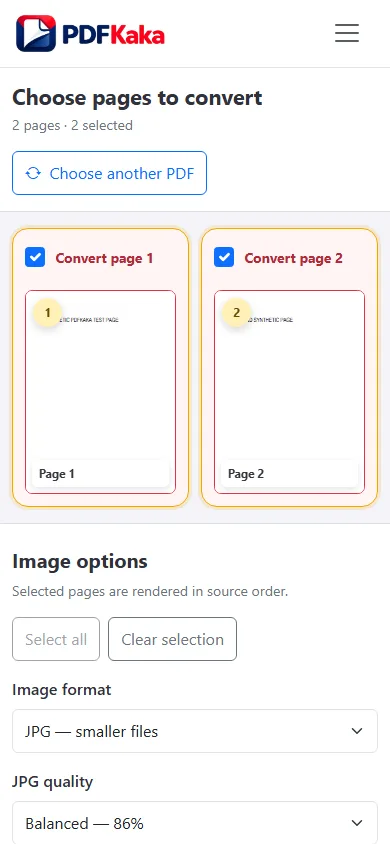
Choose the PDF from phone storage, select pages and image settings, and save the JPG or ZIP download.
Open PDF to JPG

Reviewed by PDFKaka ·

How to convert PDF to JPG on iPhone or Android

What this workflow helps you do

A phone browser can run PDF to JPG without a separate desktop program. Device memory, the mobile file picker, camera permissions, and download handling matter more on a phone, so smaller batches are easier to verify.

Choose the PDF from phone storage, select pages and image settings, and save the JPG or ZIP download.

Plan the task in PDF to JPG

Render complete PDF pages as images at the scale you choose. Use JPG for smaller photo-heavy output or PNG when lossless page images matter.

PDF to JPG renders selected pages as image files. Choose JPG for smaller photo-heavy output or PNG when crisp diagrams, interface captures, or lossless page rendering matters more than file size. Several images are packaged into a ZIP download.

  1. Convert selected PDF pages to JPG. Choose only the pages needed and set the rendering scale. A higher scale improves visible detail but also increases memory use and image size.
  2. Choose JPG or PNG for the page content. JPG normally suits photographs and smaller files. PNG preserves hard edges and text more cleanly but usually creates larger images.
  3. Understand page rendering versus image extraction. The tool creates an image of each complete page. It does not pull out original photographs or graphics embedded inside the PDF.

Complete the task reliably on a phone

The mobile file picker may show Photos, Files, Downloads, a camera option, or cloud-provider shortcuts depending on the device. Select only the sources required by PDF to JPG and return to the browser while processing finishes.

Large documents and high-resolution images use device memory. If the browser reloads or becomes unresponsive, keep the originals and retry with a smaller supported batch rather than repeatedly starting the same large job.

  1. Use a current browser and keep the tab active during processing.
  2. Save the result to Files or Downloads.
  3. Reopen the download outside the tool before sharing it.

Settings and limitations to check

Can I convert PDF to JPG online for free? Yes. Select pages and download the rendered JPG images without creating an account.

Can the JPG output be exactly 50KB or 100KB? This converter controls image format and rendering scale, not an exact KB target. Open the downloaded JPG in Image Resizer when a specific maximum is required.

Should I convert PDF to JPG or PNG? Use JPG for smaller photo-heavy pages and PNG when text, diagrams, or sharp edges need lossless image output.

  1. Use only the settings needed for the required result.
  2. Keep the source file available for comparison.
  3. Do not rely on an unsupported exact-size, fidelity, or security promise.

Review the completed file

Find the downloaded images on the phone and verify their order, clarity, and dimensions.

Open the downloaded result in a separate viewer, inspect important pages or details, and repeat the workflow with adjusted settings if the output is not suitable.

  1. Confirm the expected file type and page count.
  2. Check important text, images, order, and orientation.
  3. Share or submit only the reviewed copy.

Tools used in this workflow

Frequently asked questions

What should I prepare before following this workflow?

Choose the PDF from phone storage, select pages and image settings, and save the JPG or ZIP download.

How should I verify the result?

Find the downloaded images on the phone and verify their order, clarity, and dimensions.

Can I convert PDF to JPG online for free?

Yes. Select pages and download the rendered JPG images without creating an account.

Can the JPG output be exactly 50KB or 100KB?

This converter controls image format and rendering scale, not an exact KB target. Open the downloaded JPG in Image Resizer when a specific maximum is required.

Should I convert PDF to JPG or PNG?

Use JPG for smaller photo-heavy pages and PNG when text, diagrams, or sharp edges need lossless image output.

Do I need an account to use PDF to JPG?

No. Current PDFKaka tools work without registration or sign-in.

Are my files uploaded while I use PDF to JPG?

No. This working tool processes the selected files locally in the current browser session.