JPG to PDF Online
Turn JPG, JPEG, PNG, HEIC, and supported HEIF images into one PDF. Arrange the images and choose page size, orientation, and margins before downloading.
or drag JPG, JPEG, PNG, HEIC, or HEIF files here
JPG, JPEG, PNG, HEIC, HEIF · Up to 30 imagesView limits & supported files
- Supported files
- JPG, JPEG, PNG, HEIC, and supported HEIF still images.
- Limits
- Up to 30 images, 25 MiB per image, and 100 MiB total input. Each image may be up to 16,384 pixels on either side and 40,000,000 pixels total.
- Output limits
- Each selected image becomes one PDF page. A job can create up to 30 pages, and the generated PDF may be up to 150 MiB.
- HEIC and HEIF
- HEIC and compatible HEIF still images using supported HEVC encoding can be decoded in the browser. Other HEIF codecs may not be supported.
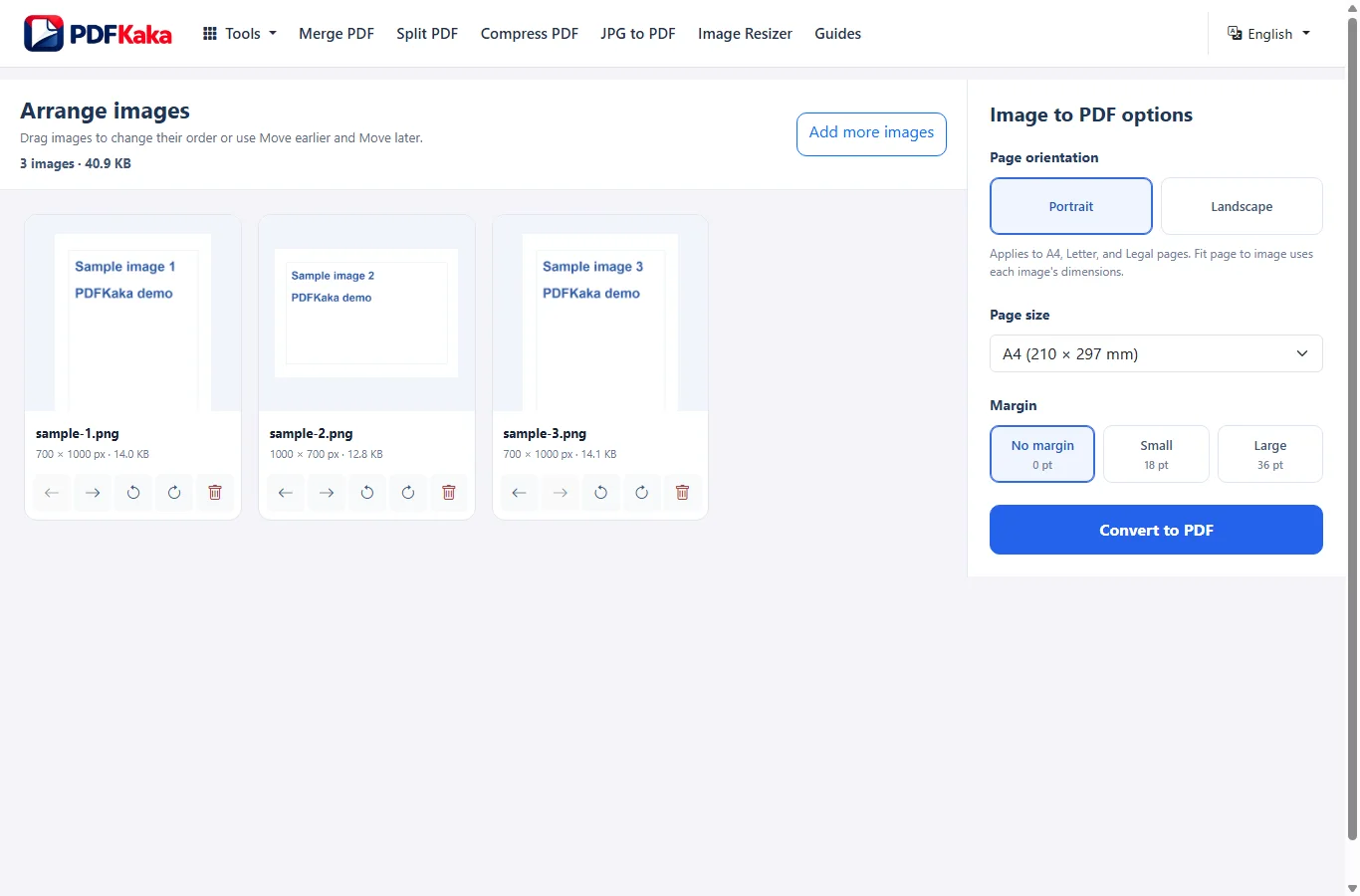
Arrange images
Drag images to change their order or use Move earlier and Move later.
Your PDF is ready
The .pdf extension is added automatically. Invalid filename characters are adjusted only when the file is downloaded.
The generated PDF remains only in this browser session unless you download or move it elsewhere.
Browser processing
No account required
Direct download
Create one PDF from multiple images
Turn one or several supported images into a multipage PDF while keeping control over image order and page layout. PDFKaka applies one page-size, orientation, and margin choice to the job, except Fit page to image, which sizes each PDF page from its source image.
Arrange images before conversion
Drag images into the order they should appear in the PDF. Each selected image becomes one PDF page, and the final page order follows the image order shown in the workspace.
Choose how PDF pages are sized
Use A4, Letter, Legal, or Fit page to image. Portrait, landscape, and margin controls apply to fixed page sizes, while Fit creates each page from the source image dimensions.
Convert locally in your browser
Image validation, supported HEIC or HEIF decoding, and PDF creation run in the browser during the normal conversion workflow. Selected image contents are not uploaded to PDFKaka for conversion.
How to Convert JPG to PDF
Use JPG to PDF when you want to turn one or more supported images into a PDF and control the page layout before downloading the result.
- Choose one or more JPG, JPEG, PNG, HEIC, or supported HEIF images.
- Arrange the images in the order they should appear in the PDF.
- Rotate any sideways image if needed.
- Choose page orientation, page size, and margins.
- Review the image previews and selected settings.
- Select Convert to PDF, then download and open the finished document.
Related PDF tools
JPG to PDF questions
Can I combine multiple JPG images into one PDF?
Yes. Add up to 30 supported images, arrange them in the required order, and create one multipage PDF. Each selected image becomes one PDF page.
Which image formats can I convert to PDF?
JPG to PDF accepts JPG, JPEG, PNG, HEIC, and supported HEIF still images. Some HEIF files that use unsupported codecs may not decode in the browser.
Can I rearrange images before converting them?
Yes. Drag images into a different order or use Move earlier and Move later. The PDF page order follows the image order shown in the workspace.
Can I rotate a sideways image before converting it?
Yes. Rotate an individual image left or right in 90-degree steps before creating the PDF. Image rotation is separate from the Portrait or Landscape setting used for fixed PDF page sizes.
What is the difference between A4 and Fit page to image?
A4, Letter, and Legal use fixed PDF page dimensions and scale the complete image to fit inside the available page area. Fit page to image creates each PDF page from the source image dimensions at 96 pixels per inch.
Does converting an image to PDF reduce image quality?
It depends on the input format and processing required. Ordinary JPEG files are usually embedded without JPEG re-encoding. JPEGs that require orientation correction may be re-encoded. PNG files use PNG embedding, while HEIC and supported HEIF images are decoded and converted before they are placed in the PDF.
What happens to PNG transparency?
PNG files use the PNG embedding path, which supports alpha transparency. JPG images do not contain alpha transparency.
What happens to HEIC or HEIF images?
Supported HEIC and HEIF still images are decoded in the browser and converted before being embedded in the PDF. The current HEIC or HEIF path uses a white background and is not a lossless passthrough of the original file.
What are the JPG-to-PDF limits?
A job may contain up to 30 images, with a maximum of 25 MiB per image and 100 MiB total input. Each image may be up to 16,384 pixels on either side and 40,000,000 pixels total. The generated PDF may be up to 150 MiB.
Are my images uploaded to PDFKaka?
Image validation, supported image decoding, and PDF creation happen locally in the browser during the normal JPG-to-PDF workflow. The selected image contents are not uploaded to PDFKaka for conversion. Normal website resources and analytics requests may still use the network.
Do I need an account?
No. JPG to PDF works without registration or sign-in.
Helpful JPG to PDF guides
JPG to PDF guide
How to Convert Multiple JPG Images Into One PDF
Turn ordered page images into one PDF while controlling page layout and readability. The useful result is a complete document in the right sequence, with no clipped writing or accidental blank-looking pages.
Read guide →
JPG to PDF guide
How to make a JPG-to-PDF file smaller
The size of an image-based PDF depends heavily on the source images. Large camera photos, many pages, and already-compressed image data can make the final PDF much larger than an upload portal allows.
Read guide →
View all PDFKaka Guides →