
Redact PDF guides

How to redact a PDF on a phone

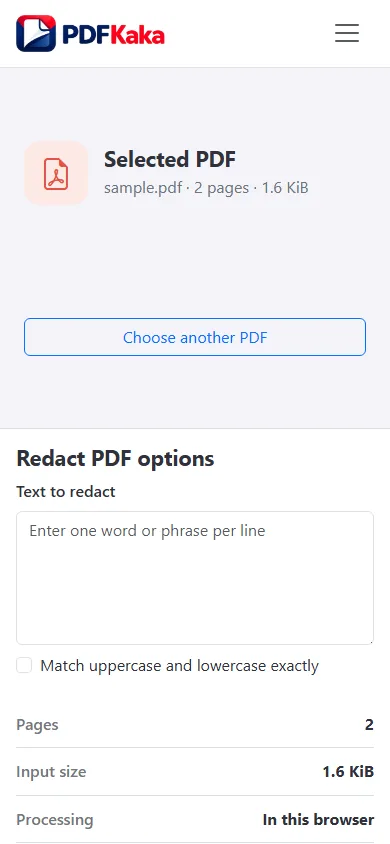
Choose a PDF from phone storage, enter exact selectable terms, generate a redacted copy, and review it at readable zoom.
Open Redact PDF

Reviewed by PDFKaka ·

How to redact a PDF on a phone

What this workflow helps you do

A phone browser can run Redact PDF without a separate desktop program. Device memory, the mobile file picker, camera permissions, and download handling matter more on a phone, so smaller batches are easier to verify.

Choose a PDF from phone storage, enter exact selectable terms, generate a redacted copy, and review it at readable zoom.

Plan the task in Redact PDF

Search for exact text runs and create a redacted copy with matching content permanently covered. Always review every result before sharing it.

Redact PDF searches for an exact selectable-text value, covers matching areas, and rebuilds affected pages so the matched source text is not retained underneath. It is a focused workflow that requires careful visual and text verification before the file is shared.

  1. Find repeated sensitive text. Enter an exact name, account number, address, or other value stored as selectable PDF text. Spacing, spelling, and PDF text segmentation affect matching.
  2. Create a flattened redacted page. Affected pages are rebuilt as images with the matches covered. Searchable text, links, fields, and signatures on those pages are not retained.
  3. Verify every redaction before sharing. Open the result, inspect every affected page, search for the original value, and keep the source file separate. Automated matching is not a substitute for review.

Complete the task reliably on a phone

The mobile file picker may show Photos, Files, Downloads, a camera option, or cloud-provider shortcuts depending on the device. Select only the sources required by Redact PDF and return to the browser while processing finishes.

Large documents and high-resolution images use device memory. If the browser reloads or becomes unresponsive, keep the originals and retry with a smaller supported batch rather than repeatedly starting the same large job.

  1. Use a current browser and keep the tab active during processing.
  2. Save the result to Files or Downloads.
  3. Reopen the download outside the tool before sharing it.

Settings and limitations to check

Can I redact a PDF online for free with no sign-up? Yes. The current exact-text workflow runs locally without registration, but every result must still be reviewed.

Can this redact words inside a scanned PDF? Not reliably. Image-only pages do not contain selectable text. OCR can help identify text, but sensitive scans still require careful manual verification.

Is drawing a black box over text enough? A visual cover can leave underlying text recoverable. This tool rebuilds affected pages, but you must still inspect and test the final copy.

  1. Use only the settings needed for the required result.
  2. Keep the source file available for comparison.
  3. Do not rely on an unsupported exact-size, fidelity, or security promise.

Review the completed file

Search and inspect the result on the phone before it leaves the device.

Open the downloaded result in a separate viewer, inspect important pages or details, and repeat the workflow with adjusted settings if the output is not suitable.

  1. Confirm the expected file type and page count.
  2. Check important text, images, order, and orientation.
  3. Share or submit only the reviewed copy.

Tools used in this workflow

Frequently asked questions

What should I prepare before following this workflow?

Choose a PDF from phone storage, enter exact selectable terms, generate a redacted copy, and review it at readable zoom.

How should I verify the result?

Search and inspect the result on the phone before it leaves the device.

Can I redact a PDF online for free with no sign-up?

Yes. The current exact-text workflow runs locally without registration, but every result must still be reviewed.

Can this redact words inside a scanned PDF?

Not reliably. Image-only pages do not contain selectable text. OCR can help identify text, but sensitive scans still require careful manual verification.

Is drawing a black box over text enough?

A visual cover can leave underlying text recoverable. This tool rebuilds affected pages, but you must still inspect and test the final copy.

Do I need an account to use Redact PDF?

No. Current PDFKaka tools work without registration or sign-in.

Are my files uploaded while I use Redact PDF?

No. This working tool processes the selected files locally in the current browser session.