TXT to PDF guides
How to convert TXT to PDF on iPhone or Android
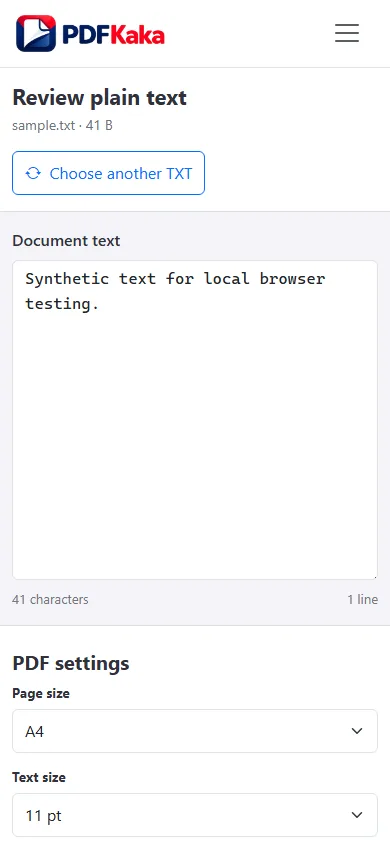
Choose a text file from phone storage, set a readable layout, and download the PDF from the mobile browser.
Open TXT to PDFReviewed by PDFKaka ·
What this workflow helps you do
A phone browser can run TXT to PDF without a separate desktop program. Device memory, the mobile file picker, camera permissions, and download handling matter more on a phone, so smaller batches are easier to verify.
Choose a text file from phone storage, set a readable layout, and download the PDF from the mobile browser.
Plan the task in TXT to PDF
Convert plain text into a paginated PDF, choose the available page and text settings, and keep the generated document inside the current browser session.
TXT to PDF paginates plain text using the paper size, margins, font size, and line spacing you choose. The result keeps text selectable and creates a stable document for printing, reviewing, or sharing without turning the text into screenshots.
- Create PDF pages from a TXT file. Choose a UTF-8 text file, review its content, adjust the page settings, and create a consistently paginated PDF.
- Keep plain text selectable. The generated PDF stores real text rather than page images, making simple notes, logs, and drafts easier to search and copy.
- Choose readable text spacing. Paper size, margins, font size, and line spacing determine how much content appears on each page. Very long lines wrap within the selected margins.
Complete the task reliably on a phone
The mobile file picker may show Photos, Files, Downloads, a camera option, or cloud-provider shortcuts depending on the device. Select only the sources required by TXT to PDF and return to the browser while processing finishes.
Large documents and high-resolution images use device memory. If the browser reloads or becomes unresponsive, keep the originals and retry with a smaller supported batch rather than repeatedly starting the same large job.
- Use a current browser and keep the tab active during processing.
- Save the result to Files or Downloads.
- Reopen the download outside the tool before sharing it.
Settings and limitations to check
Can I convert TXT to PDF online for free? Yes. Choose a supported plain-text file and create the PDF without registration.
Does TXT to PDF understand Markdown formatting? No. The input is treated as plain text; Markdown and rich-text styling are not interpreted.
Will every writing system display correctly? The current standard PDF font is intended for basic Latin characters. Review non-Latin or specialist characters before relying on the result.
- Use only the settings needed for the required result.
- Keep the source file available for comparison.
- Do not rely on an unsupported exact-size, fidelity, or security promise.
Review the completed file
Open the result on the phone and verify line wrapping, font size, and the final paragraphs.
Open the downloaded result in a separate viewer, inspect important pages or details, and repeat the workflow with adjusted settings if the output is not suitable.
- Confirm the expected file type and page count.
- Check important text, images, order, and orientation.
- Share or submit only the reviewed copy.
Tools used in this workflow
Frequently asked questions
What should I prepare before following this workflow?
Choose a text file from phone storage, set a readable layout, and download the PDF from the mobile browser.
How should I verify the result?
Open the result on the phone and verify line wrapping, font size, and the final paragraphs.
Can I convert TXT to PDF online for free?
Yes. Choose a supported plain-text file and create the PDF without registration.
Does TXT to PDF understand Markdown formatting?
No. The input is treated as plain text; Markdown and rich-text styling are not interpreted.
Will every writing system display correctly?
The current standard PDF font is intended for basic Latin characters. Review non-Latin or specialist characters before relying on the result.
Do I need an account to use TXT to PDF?
No. Current PDFKaka tools work without registration or sign-in.
Are my files uploaded while I use TXT to PDF?
No. This working tool processes the selected files locally in the current browser session.