TXT to PDF
How to convert TXT to PDF on iPhone or Android
Choose a text file from phone storage, set a readable layout, and download the PDF from the mobile browser.
On this page
Voir un exemple visuel
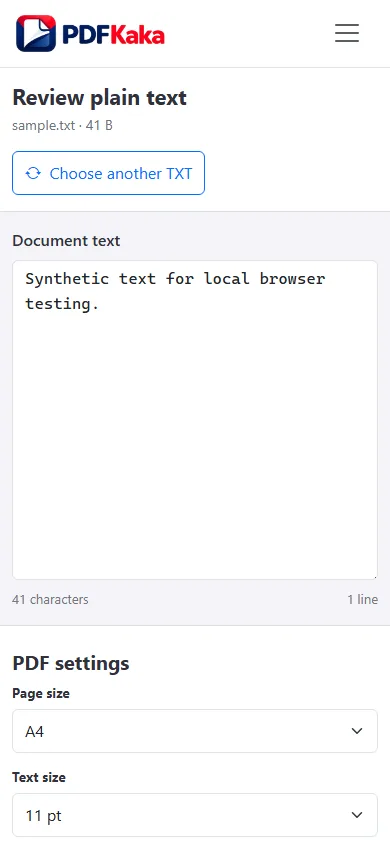
Convert the text file to PDF
- Locate the .txt file in storage that the phone file picker can open.
- Select it in TXT to PDF and check Document text for the correct beginning and end.
- Choose a page size, readable text size, margins and spacing.
- Create the PDF without leaving the tab, then download the finished file.
- Open the saved PDF and verify the final paragraphs and any long wrapped lines.
TXT to PDF works from plain text
UTF-8 plain text becomes selectable PDF text using the built-in Helvetica font. Unsupported characters stop conversion. Source line breaks and blank lines are retained, long lines wrap, and repeated spaces or tabs are not an exact column-layout mechanism.
A note exported from a phone app
Export the note as plain UTF-8 text before opening it in the converter. If the note depends on emoji, check the supported-character message before expecting a PDF: the current font does not provide universal emoji or script coverage. Keep the original note when another font-aware workflow is needed.
Check this result before reusing it
- Check that the app exported text rather than rich HTML or a proprietary note file.
- Verify that a large phone text setting has not been mistaken for the PDF’s actual text size.
- Use the downloaded PDF, not just its result message, for the final check.
FAQ
Can TXT to PDF preserve rich-text formatting or embedded images?
No. The input is plain text, so rich-text styling, embedded images, and arbitrary font-family choices are outside the current workflow.
What is the current input limit for TXT to PDF?
One UTF-8 .txt file up to 10 MiB and 1,000,000 characters, within the displayed limit of 1,000 generated pages. A larger font or wider margins can increase the page count.
What does TXT to PDF create?
UTF-8 plain text becomes selectable PDF text using the built-in Helvetica font. Unsupported characters stop conversion. Source line breaks and blank lines are retained, long lines wrap, and repeated spaces or tabs are not an exact column-layout mechanism.
Can I change the text before creating the PDF?
Yes. The Document text editor allows corrections before generation; change the source there and create a new output.