Organize PDF guides
How to organize PDF pages on iPhone or Android
Use mobile-friendly page controls to reorder and rotate a PDF from phone storage.
Open Organize PDFReviewed by PDFKaka ·
What this workflow helps you do
A phone browser can run Organize PDF without a separate desktop program. Device memory, the mobile file picker, camera permissions, and download handling matter more on a phone, so smaller batches are easier to verify.
Use mobile-friendly page controls to reorder and rotate a PDF from phone storage.
Plan the task in Organize PDF
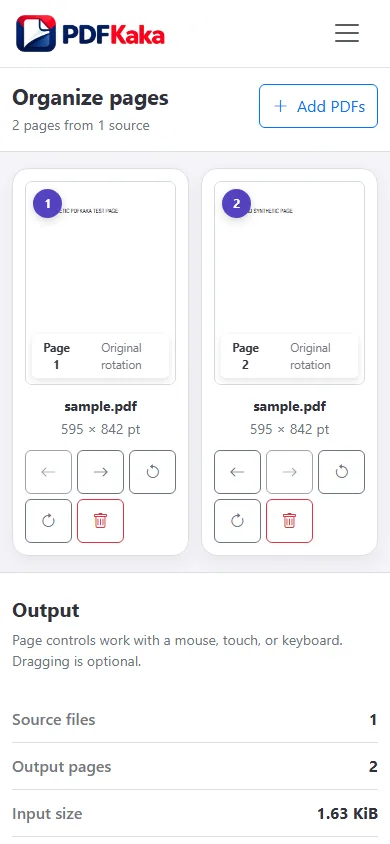
Add one or more PDFs, then arrange, rotate, or remove individual pages before creating one organized document.
Organize PDF is the page-level workspace for documents that need more than a simple merge. Add one or more PDFs, inspect the combined thumbnails, move individual pages, correct orientation, remove unnecessary pages, and build the final sequence locally.
- Organize PDF pages visually. Use thumbnails to understand the complete document before changing it. Move pages into the required order and verify section boundaries, front and back pages, and attachments.
- Combine and organize several PDFs. Pages from multiple PDFs can share one workspace. This is useful when complete-file ordering is not enough and individual pages must be interleaved.
- Correct page order and orientation together. Rotate sideways pages while arranging the sequence, then remove duplicates or blanks before creating one organized PDF.
Complete the task reliably on a phone
The mobile file picker may show Photos, Files, Downloads, a camera option, or cloud-provider shortcuts depending on the device. Select only the sources required by Organize PDF and return to the browser while processing finishes.
Large documents and high-resolution images use device memory. If the browser reloads or becomes unresponsive, keep the originals and retry with a smaller supported batch rather than repeatedly starting the same large job.
- Use a current browser and keep the tab active during processing.
- Save the result to Files or Downloads.
- Reopen the download outside the tool before sharing it.
Settings and limitations to check
Can I organize PDF pages online for free? Yes. Add the PDFs, arrange their pages, and download the organized result without creating an account.
Can I add pages from another PDF? Yes. Add more than one PDF to the workspace and place their pages wherever they belong in the final sequence.
When is Merge PDF faster than Organize PDF? Use Merge PDF when each complete document is already internally correct. Use Organize PDF when individual pages need attention.
- Use only the settings needed for the required result.
- Keep the source file available for comparison.
- Do not rely on an unsupported exact-size, fidelity, or security promise.
Review the completed file
Reopen the downloaded PDF on the phone and swipe through the complete sequence.
Open the downloaded result in a separate viewer, inspect important pages or details, and repeat the workflow with adjusted settings if the output is not suitable.
- Confirm the expected file type and page count.
- Check important text, images, order, and orientation.
- Share or submit only the reviewed copy.
Tools used in this workflow
Frequently asked questions
What should I prepare before following this workflow?
Use mobile-friendly page controls to reorder and rotate a PDF from phone storage.
How should I verify the result?
Reopen the downloaded PDF on the phone and swipe through the complete sequence.
Can I organize PDF pages online for free?
Yes. Add the PDFs, arrange their pages, and download the organized result without creating an account.
Can I add pages from another PDF?
Yes. Add more than one PDF to the workspace and place their pages wherever they belong in the final sequence.
When is Merge PDF faster than Organize PDF?
Use Merge PDF when each complete document is already internally correct. Use Organize PDF when individual pages need attention.
Do I need an account to use Organize PDF?
No. Current PDFKaka tools work without registration or sign-in.
Are my files uploaded while I use Organize PDF?
No. This working tool processes the selected files locally in the current browser session.