Remove pages guides
How to remove multiple pages from one PDF
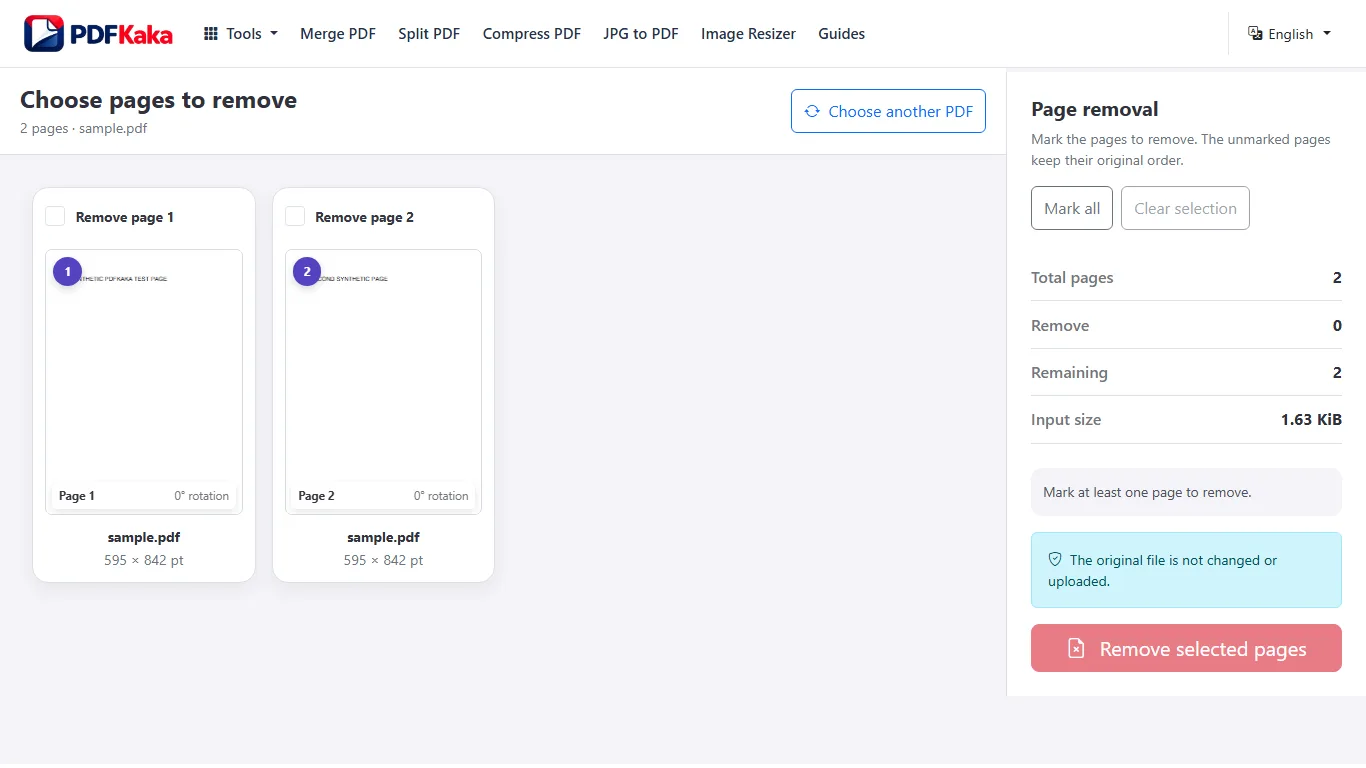
Select several blank, duplicate, or unnecessary pages in one review and create a PDF from everything that remains.
Open Remove pagesReviewed by PDFKaka ·
What this workflow helps you do
This workflow is for a task involving several files or pages. Plan the order and intended outputs before opening Remove pages, because a quick thumbnail review prevents missing, duplicated, or misplaced content.
Select several blank, duplicate, or unnecessary pages in one review and create a PDF from everything that remains.
Plan the task in Remove pages
Mark unwanted pages in a visual preview and create a new PDF from everything that remains. Your original document is never overwritten.
Remove Pages is designed for documents where most pages should remain. Mark blank scans, duplicate pages, expired attachments, or other unwanted pages in the visual workspace, then create a cleaned PDF from everything that is left.
- Remove PDF pages with a visual check. Page thumbnails make it easier to identify what is being removed than typing page numbers from memory. Review neighbouring pages so similar-looking scans are not selected accidentally.
- Delete pages without changing the original. The tool creates a separate cleaned PDF. The source document on your device is never overwritten, which gives you a safe copy to return to if the wrong page was selected.
- Remove pages and reorganize the result. When the remaining pages also need a different order, create the cleaned copy first and open it in Organize PDF, or use Organize PDF to perform both tasks in one page-level workspace.
Plan the files, pages, and output order
For this Remove pages task, decide what belongs in the result before processing. File names are useful clues, but page thumbnails and the intended reading sequence are the final check.
Select several blank, duplicate, or unnecessary pages in one review and create a PDF from everything that remains.
- Count the required source files or pages.
- Put them into the intended sequence and remove duplicates.
- Compare the expected count with the completed output.
Settings and limitations to check
Can I remove pages from a PDF online for free? Yes. Select the pages to delete and create a new PDF containing the remaining pages without an account.
Can every page be removed? No. At least one page must remain because an output PDF cannot be created with no pages.
Does removing a page reduce the quality of the other pages? No image recompression is applied to retained pages. They are copied into the cleaned document.
- Use only the settings needed for the required result.
- Keep the source file available for comparison.
- Do not rely on an unsupported exact-size, fidelity, or security promise.
Review the completed file
Compare the removed-page list with the final page count before using the cleaned document.
Open the downloaded result in a separate viewer, inspect important pages or details, and repeat the workflow with adjusted settings if the output is not suitable.
- Confirm the expected file type and page count.
- Check important text, images, order, and orientation.
- Share or submit only the reviewed copy.
Tools used in this workflow
Frequently asked questions
What should I prepare before following this workflow?
Select several blank, duplicate, or unnecessary pages in one review and create a PDF from everything that remains.
How should I verify the result?
Compare the removed-page list with the final page count before using the cleaned document.
Can I remove pages from a PDF online for free?
Yes. Select the pages to delete and create a new PDF containing the remaining pages without an account.
Can every page be removed?
No. At least one page must remain because an output PDF cannot be created with no pages.
Does removing a page reduce the quality of the other pages?
No image recompression is applied to retained pages. They are copied into the cleaned document.
Do I need an account to use Remove pages?
No. Current PDFKaka tools work without registration or sign-in.
Are my files uploaded while I use Remove pages?
No. This working tool processes the selected files locally in the current browser session.