Crop PDF
How to crop a PDF on iPhone or Android
Choose a PDF from phone storage, adjust the visible page area, and save a cropped copy from the mobile browser.
Voir un exemple visuel
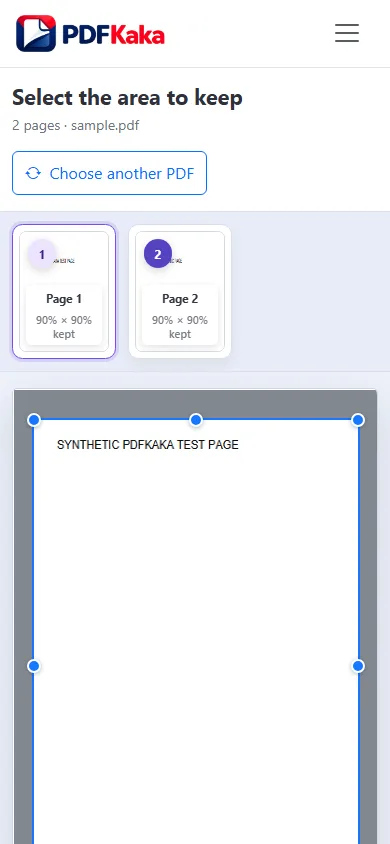
Follow the supported controls
- Choose the PDF in the mobile browser and wait for its preview.
- Choose Current page only for an outlier or All pages for a consistent document.
- Change the top, right, bottom and left percentages gradually; use the numeric fields when touch handles are difficult.
- Create the copy, save through the browser and reopen it from device storage to check edges and page orientation.
Check details at a useful reading size
Phone screens can make a footer, handwritten note or stamp look like blank margin. Leave space around such details, and inspect the downloaded PDF at a useful zoom. The crop is manual; the tool does not automatically detect paper edges, deskew a scan or delete hidden confidential content.
FAQ
Can I enter crop values instead of dragging?
Yes. The edge controls accept percentages; numeric values can be easier to set on a small screen.
Are my pages uploaded for cropping?
The normal crop workflow processes the selected PDF locally in the browser.
Does cropping correct a tilted scan?
No. It adjusts visible page boundaries, not perspective or scan skew.